Your own ebooks on your Kobo, without the cable
Keep your books where they already are: a folder in Google Drive, your Nextcloud, a NAS, a Komga. Press Sync on the Kobo and they arrive over Wi-Fi, with covers, series and your collections.
Wireless, the Kobo’s own way
The Sync button you already have
A Kobo syncs with Kobo’s store over Wi-Fi. Bookcanon answers that same sync, so your own library comes down the way a bought book does: no app to run on a computer, no cable, no folder to drag files into.
New books in your library show up on the Kobo at its next sync. Books you remove are taken off it.
- Works over any Wi-Fi, at home or away
- Covers, authors, series and their order
- The Kobo store keeps working beside it

Collections
Shelved before you open it
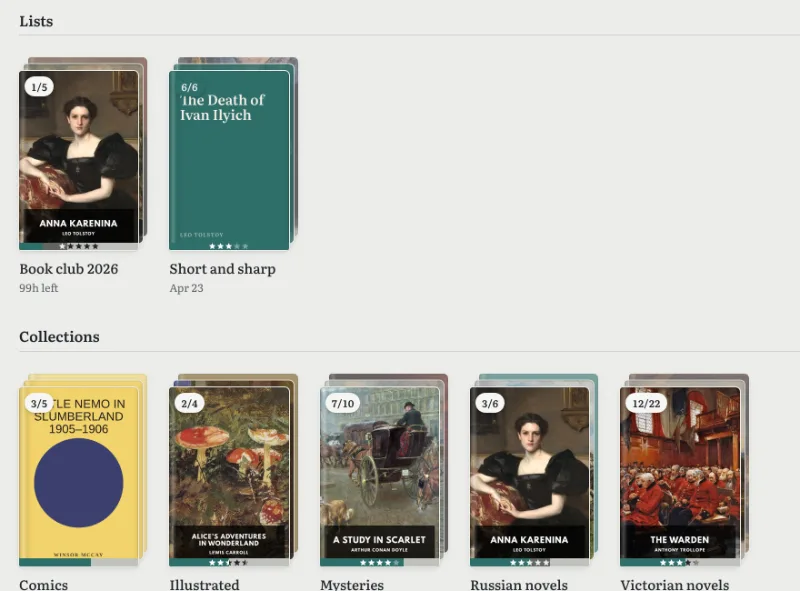
Sideload a hundred books and the Kobo hands you a hundred loose files. With Bookcanon, every list and collection you make becomes a collection on the Kobo, and stays in step.
A list can hold single books, whole series, even other lists. Rename one, reorder it or add a book, and the Kobo has it at the next sync. Your backlog is a collection too, always showing what’s next.
Your library, where it lives
Google Drive, Nextcloud, a NAS or Komga
Point Bookcanon at a folder and it reads what’s there: EPUB and KEPUB for the Kobo, and PDFs and CBZ or CBR comics to read in the browser. A Calibre library folder works as it is, with its covers and details.
Books stay in your storage. Move or rename a file and its reading stays with it. Drop a new one in the folder, or upload it from Bookcanon, and it’s on its way.
- Google Drive, with access to the one folder you pick
- WebDAV: Nextcloud, ownCloud, Synology, Koofr and others
- A Komga server of your own

Made for the Kobo
Converted on the way, so the Kobo does its best
A plain EPUB on a Kobo misses out: no reading statistics, no time left in the chapter, slower page turns. Bookcanon converts each EPUB to Kobo’s own KEPUB as it sends it, so every book gets the full treatment.
Your place travels too. Stop on the Kobo, open the book in a browser or on your phone, and you’re on the same page.

Setting up
About two minutes, once
- Connect your libraryChoose your Google Drive folder, or add your WebDAV server or Komga with its address.
- Add your KoboBookcanon gives you an address that is this Kobo’s alone.
- Put the address on the KoboPlug the Kobo into a computer, open
.kobo/Kobo/Kobo eReader.conf, and set theapi_endpointline to that address. Nothing is installed and the Kobo’s software isn’t changed. - Unplug and press SyncYour books and collections arrive. Bookcanon notices the first sync and tells you it worked.
Questions
Kobo sync, answered
How do I send my own EPUBs to a Kobo wirelessly?
With Bookcanon, you keep your EPUBs in Google Drive, on a WebDAV server such as Nextcloud, or in Komga, and set your Kobo to sync with Bookcanon. After that, pressing Sync on the Kobo downloads your books over Wi-Fi, with their covers and collections.
Do I need Calibre or a computer running at home?
No. Bookcanon is a hosted service, so nothing has to stay switched on. You need a computer once, for a minute, to set the Kobo’s sync address. If you keep a Calibre library in a synced folder, Bookcanon reads it as it is.
Will books from the Kobo store still sync?
Yes. What isn’t from your own library is passed on to Kobo with your Kobo account, as before. Bought books, your wishlist and the store keep working.
Is my Kobo modified or jailbroken?
No. Only one line in a settings file changes: the address the Kobo syncs with. Change it back and the Kobo syncs with Kobo alone again.
Can several people use it, each with their own Kobo?
Yes. Each reader has their own account, library, collections and reading record, and each Kobo has its own address. A reader can have more than one Kobo.
Do PDFs and comics go to the Kobo?
EPUB and KEPUB files go to the Kobo, comics in EPUB among them. PDFs and CBZ or CBR comics are part of your library and open in Bookcanon’s reader in the browser.
Private beta
Your next sync could be the first one that remembers.
Bookcanon is opening to a few readers at a time. Leave your address and we’ll write once, when there’s a place for you.
- Joining the list is free and commits you to nothing
- Your address is used for the invitation only
- Take your name off whenever you like